Workflow Automation
Build practical workflows for form submissions, notifications, data routing, repetitive administrative work, simple approvals, and scheduled tasks when automation genuinely removes unnecessary effort.

If a repetitive task is wasting time, or several tools refuse to cooperate with each other, I like figuring out why—and whether there is a practical way to make the process work better.
That can involve automation, APIs and webhooks, forms, data movement, AI-assisted workflows, website integrations, troubleshooting, or simply reorganizing an inefficient process. Sometimes the right answer is not to automate anything.
Tell Me What Is Getting Stuck See What I Can Help WithAutomation is most useful when it removes repetitive administrative work, reduces unnecessary copying and pasting, connects tools that already belong in the same process, or makes information easier to move and use.
The goal is not automation for automation’s sake. Sometimes simplifying a workflow, changing a setting, or using an existing tool properly is better than building something custom. People should still handle the parts that need context, judgment, empathy, or a decision the software cannot responsibly make.
Not every automation needs to be complicated.
This workflow connects a website contact form to a simple follow-up process. When someone submits the form, the information is captured and organized, an internal notification is sent, and the customer receives a branded response with a link to schedule a conversation.
The goal wasn’t to automate the relationship. It was to remove the repetitive steps around it.
Website Form → Capture Submission → Internal Alert → Customer Follow-Up → Scheduling
A few connected steps can turn a basic contact form into a more useful follow-up workflow without introducing unnecessary complexity.
View the Project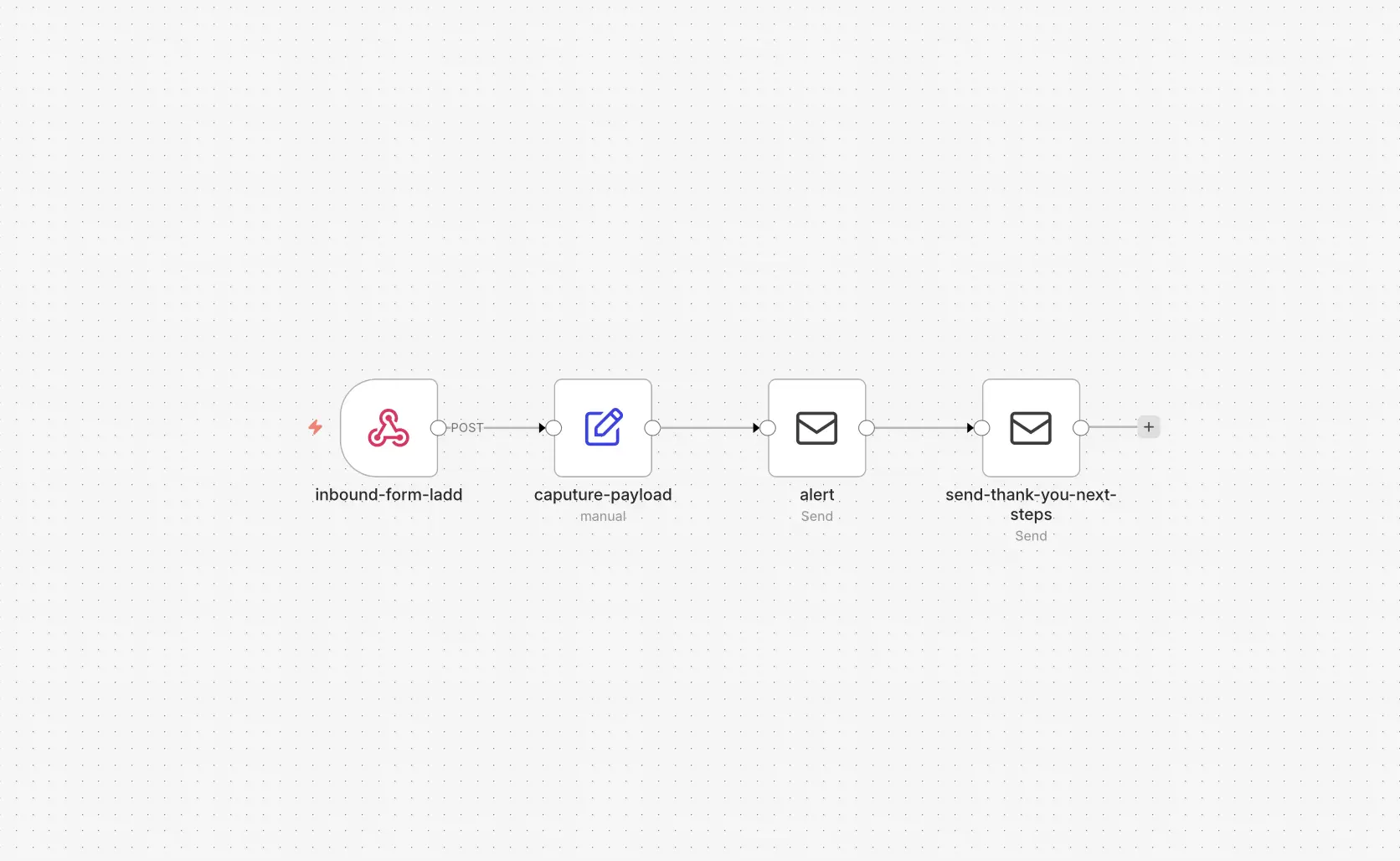
Practical assistance for repetitive, disconnected, or unnecessarily complicated digital work—within the limits of the tools, access, and systems involved.
Build practical workflows for form submissions, notifications, data routing, repetitive administrative work, simple approvals, and scheduled tasks when automation genuinely removes unnecessary effort.
Help existing systems communicate through APIs, webhooks, forms, n8n workflows, or established integrations when the platforms and available access support it.
Use AI as one useful step for research, organization, summarization, classification, drafting assistance, or repetitive information processing—with a person still involved where judgment matters.
Connect website forms to notifications, lead routing, access requests, basic data handling, appropriate automated responses, and the workflows that need to receive the information.
Trace forms, integrations, webhooks, configurations, deployments, and tangled workflows to understand why something is not behaving as expected and identify a practical next step.
A useful automation starts with understanding what is actually happening—not choosing a fashionable tool and looking for somewhere to put it.
I look at where information begins, who needs it, which steps require a person, what can fail, and who will need to understand the workflow later.
Not every platform exposes the access, API, webhook, or integration a workflow needs. Existing software plans, permissions, data quality, privacy requirements, and third-party reliability all affect what is sensible.
When a connection is not realistic, I will explain the limitation instead of pretending every tool can automatically talk to every other tool.
A straightforward process that checks for the simplest answer before adding more technology.
Map what happens now, what keeps being repeated, where the frustration begins, and where the information needs to go.
See whether the current software already provides the needed feature or whether an established integration solves the problem before building something custom.
Remove unnecessary steps where possible. A five-step process that can become two steps may not need sophisticated automation at all.
When automation is appropriate, connect the necessary systems using the simplest approach that can be understood and maintained.
Check missing information, unexpected inputs, duplicate submissions, failed requests, and what happens when a connected service does not respond.
The right workflow depends on the business and the systems involved. These are realistic examples of the kinds of problems this work can address, not claims about completed client projects.
A related website development project may include the form or website connection where the workflow begins.
Sometimes the best technical solution is deleting three unnecessary steps, changing a setting, or using software you already pay for.
I prefer the simplest maintainable solution over custom infrastructure built merely because it is possible. If the automation would be more fragile, confusing, or expensive to maintain than the original task, it may not be the right solution.
I use familiar web and workflow tools where they fit, without treating a technology list as a promise that every system can be supported.
The site’s tools and experiments also show how small, focused utilities can answer one useful question without becoming a giant platform.
If you are repeatedly copying information, jumping between systems, or fighting with a workflow that should be simpler, tell me what is happening. We can start by figuring out whether it actually needs automation.
Describe the Problem